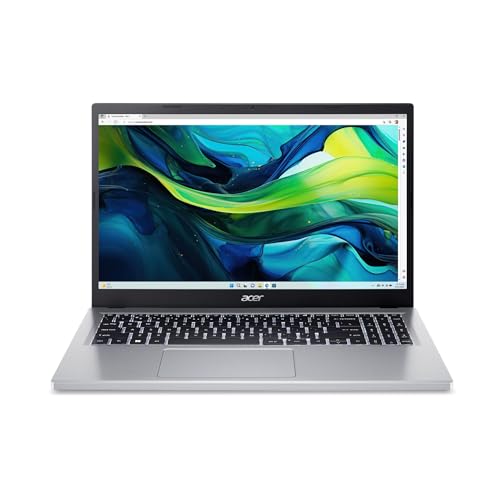
If all you need is a low-cost Windows laptop for email, web pages, documents and streaming, the Acer Aspire Go 15 is a good match. This listing is the AG15-31P-3947: a 15.6-inch Full HD IPS screen, an Intel Core i3-N305, 8GB of LPDDR5 memory and Windows 11 Home in S mode, with Wi-Fi 6. It is a 2024 design that is still on sale, so this page is upfront about what it is: a basic laptop for light use. It also explains S mode, which surprises many buyers.
A note on sources. Acer’s own product page for the exact AG15-31P-3947 would not open for us. Our sources are Notebookcheck’s spec sheet for a sibling AG15-31P version (the AG15-31P-34JP, which has a different storage size) and Microsoft’s official support pages. Where the listing and those sources differ, we say so. We do not test products ourselves.
The Exact Configuration
The Amazon listing for this model names a 15.6-inch Full HD IPS display, an Intel Core i3-N305, Intel UHD Graphics, 8GB of LPDDR5 memory, 128GB of storage, Wi-Fi 6, and Windows 11 Home in S mode. Acer sold the AG15-31P with several storage sizes and regional variations, and the Notebookcheck page we opened covers a version with a 512GB drive. So the sibling model is a guide to the platform, not a promise about this exact listing. Confirm storage and Windows edition on the listing.
What the Processor Means
Notebookcheck’s spec sheet lists the Core i3-N305 as an eight-core processor with 15W of sustained power and Intel UHD Graphics. Efficiency is the point: it is designed for low power, not speed. For web browsing, documents, streaming video and video calls it is adequate. It is not built for editing video, working with large photo libraries, running many programs at once or playing modern games, and Notebookcheck’s page lists weak CPU and GPU performance among the model’s drawbacks. If you want a laptop that will feel quick for several years, a more powerful model costs more but may be worth it.
Screen, Weight and Battery
According to Notebookcheck’s spec sheet, the Aspire Go 15 has a 15.6-inch 1920 by 1080 IPS display with a matte finish and a 60Hz refresh rate. The same page lists low sRGB coverage among its drawbacks, so colors will look ordinary. That is acceptable for documents and video but not for photo editing.
The sibling model weighs 3.77 lb (1.71 kg), with the power adapter adding about 0.74 lb (334 g), and it has a 53.05Wh battery. Those are published figures for the sibling, not for your exact listing, and the sheet does not give a runtime we can rely on. A 15.6-inch laptop at under four pounds is easy enough to carry around the house, a campus or an office.
Memory and Storage
The memory is soldered. Notebookcheck’s sheet says there are no memory slots, so the 8GB on this listing is what you have for the life of the laptop. For basic tasks, 8GB is acceptable, but it leaves little room for many browser tabs and programs together.
The listing mentions 128GB of storage. That is small. Windows and its updates use a large part of it, and once you add a few programs and a year of downloads you will feel the limit. The Notebookcheck page lists one M.2 2280 PCIe drive slot for the sibling model, and it does not say whether a second slot is free. The listing does not say whether this exact configuration has a replaceable M.2 drive, so do not count on a later upgrade. The simplest fix is to use cloud storage, such as OneDrive or Google Drive, and a USB drive or external drive for photos and big files.
Ports
Notebookcheck’s spec sheet for the sibling model lists two USB 3.x Gen 1 ports, one USB 3.1 Gen 2 port, a USB-C port with Power Delivery, HDMI, DisplayPort, a headset jack and a Kensington lock slot, plus TPM 2.0. That is a decent selection for an inexpensive laptop. Because the listing is a different variant, check the ports in the listing photos.
Windows 11 in S Mode, Explained
This laptop ships with Windows 11 Home in S mode. Microsoft describes S mode as a version of Windows 11 streamlined for security and performance. In S mode you can only install apps from the Microsoft Store, Microsoft Edge is required for safe browsing, and Edge is the default browser with Bing as the default search engine. Microsoft says this keeps the device running faster and more securely.
For many people, such as someone who only browses the web, writes documents and streams video, that is not a problem. The limitation appears when you need a program that is not in the Store, such as certain school or work programs, some printer software, or another web browser. To use those, you need to switch out of S mode.
Microsoft states that there is no charge to switch out of S mode, and also that switching is one-way: you cannot go back. To switch, open the Switch out of S mode page that Microsoft links, select Get and wait for the confirmation. Microsoft specifically warns against using the link under “Upgrade your edition of Windows,” because that is a different process that leaves you in S mode. If a school or employer manages the laptop, the organization can choose to keep devices in S mode, so check first.
If you are buying for a child, S mode can be a feature: it limits what can be installed. Decide before you buy whether you want that.
Who Should Buy the Aspire Go 15
- You want a low-cost Windows laptop with a large 15.6-inch screen.
- Your use is basic: browsing, email, documents, streaming and video calls.
- You are comfortable with cloud storage or a USB drive.
- You do not mind S mode, or you are happy to switch out of it.
Who Should Skip It
- You need space for many files, photos or games. The listing’s storage is small.
- You need to run demanding programs or edit video or photos.
- You want a long-lived laptop with room to grow. The soldered memory cannot be upgraded.
- Your needs fit in a browser. A Chromebook such as the Acer Chromebook Plus 514 is lighter, simpler and has a touchscreen, though it cannot run Windows programs.
What to Check on the Listing
- Confirm the model number AG15-31P-3947, the Core i3-N305, 8GB of memory and the storage size.
- Look at the seller and shipping lines. Prefer Amazon, Acer or an authorized retailer, and check the warranty terms.
- Check that the listing says Windows 11 Home in S mode, and decide whether you will switch out.
- Remember that this is a 2024 design that is still sold. It is not a new model.
- Plan your storage: cloud service, USB drive or external drive.
Bottom Line
The Acer Aspire Go 15 is a low-cost Windows laptop for basic tasks. Its large Full HD screen and light weight are attractive at its level, and S mode is easy to leave if it gets in the way. Its small storage, soldered memory and modest processor make it a light-use machine. If that matches your needs, it is a reasonable choice. If you want more room, speed or longevity, look higher in the range.
See price on Amazon
See how it stacks up against eight other laptops in our 2026 laptop rankings.
Sources