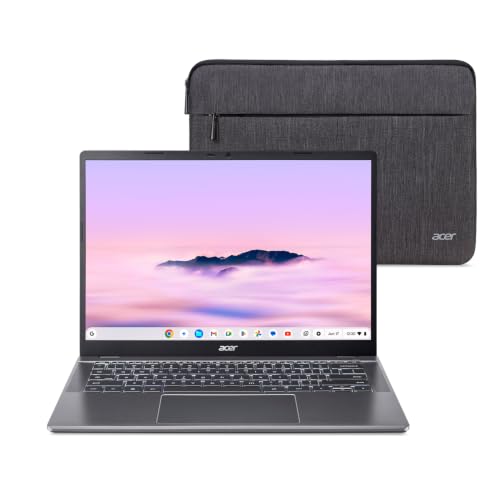
Plenty of people only need a laptop for the web, email, documents, video calls and homework. For them, a Chromebook is often easier to set up and maintain than a Windows laptop. The Acer Chromebook Plus 514 in this listing is the CB514-5HT-33RD: a 14-inch touchscreen laptop with an Intel Core i3-1315U, 8GB of memory, a 256GB SSD and Wi-Fi 7. This page explains what that means in everyday terms, what ChromeOS can and cannot do, and what to check before you buy.
A note on sources. Acer’s own product page for this model would not open for us, so we rely on a published spec database and Google’s official update page, and we flag every detail that you should confirm on the listing. The Acer page that we could open belongs to an older model (the CB514-4H), and we did not use it for this profile because the CB514-5HT is a different machine. We do not test products ourselves.
What “Chromebook Plus” Means
A Chromebook runs ChromeOS, Google’s operating system, instead of Windows or macOS. It starts quickly, installs updates in the background and keeps most of your files in your Google account. “Chromebook Plus” is Google’s label for Chromebooks with stronger hardware and extra features, and Acer markets this model as a “Chromebook Plus laptop with Google AI.” The practical effect for a buyer is a laptop that is meant to handle many browser tabs and video calls more smoothly than the cheapest Chromebooks. Check Acer’s listing and Google’s description of the features available on your account, since some are limited to certain regions or require a Google account type.
The Exact Configuration
The Amazon listing names the model number CB514-5HT-33RD, an Intel Core i3-1315U, 8GB of LPDDR5 memory, a 256GB SSD, Wi-Fi 7, an FHD camera and a 14-inch matte IPS touch display. The Starry Hope Chromebook database, a published community reference, lists the same processor (six cores, up to 4.5GHz), 8GB of soldered memory and a 256GB NVMe SSD for this model. Soldered means the memory cannot be upgraded later, so the 8GB you buy is the 8GB you keep.
The listing title gives the display as “WUXGA 1920 x 1080,” which mixes two different resolution names. The database lists 1920x1200, which would be 16:10, a shape that gives you slightly more vertical space for documents. We could not confirm this on Acer’s page, so treat the resolution as something to verify on the listing before you buy.
The Core i3-1315U is an efficient laptop processor with six cores. For browsing, Google Docs, streaming and video calls, that is a reasonable match for 8GB of memory. If you tend to keep dozens of tabs open and run a few Android apps at the same time, 8GB can start to feel tight, and a model with more memory would be more comfortable. Chromebook Plus devices are not designed for demanding video editing or modern games. Cloud gaming services work in the browser, but they depend on your internet connection.
Display, Weight and Battery
The database lists the screen as a 14-inch IPS touchscreen and the weight as 3.31 lb (1.5 kg), so it is easy to carry to class. It also lists a 53Wh battery. The same page shows the battery-life line as unknown, so we do not have a trustworthy runtime, and the one user comment on that page is anecdotal. Acer has published “up to 11 hours” for the older CB514-4H, but that is a different model, so we do not carry that number over. Count on a full school or work day only after checking recent customer reviews on Amazon.
Ports and Connectivity
According to the database, the laptop has two USB-C 3.2 Gen 2 ports that support DisplayPort and Power Delivery, both on the left side, two USB-A 3.2 Gen 1 ports and a full-size HDMI port. It lists Wi-Fi 7 and Bluetooth 5.3. Wi-Fi 7 only helps if your router supports it, but the laptop will connect to older routers as usual. With two USB-C ports you can charge from either one and connect a monitor, though you should check which charger is included on your listing.
Software Updates: Check the Expiration Date
This is the most important point for any Chromebook buyer. Every ChromeOS model has an Auto Update Expiration (AUE) date. After that date, the laptop still works, but Google no longer sends it new software and security updates. Google’s Auto Update policy page says that ChromeOS devices receive 10 years of updates, counted from the platform’s release rather than from the day you buy, and it publishes a list of approved devices with an “Automatic updates until” date for each one. The Starry Hope database gives June 2033 as the date for the CB514-5HT, and you should confirm that on Google’s page before you buy. You can also check any Chromebook you already own on the device: open Settings, go to About ChromeOS and look for the update schedule.
A longer update window means a longer useful life. If you are buying this laptop for a child, a student or a parent, a date several years away is a good sign.
What ChromeOS Can and Cannot Run
ChromeOS runs the Chrome browser, web apps, Google Workspace (Docs, Sheets, Slides, Meet), Android apps from Google Play on supported devices, and Linux apps on many models. It does not run the standard Windows or Mac versions of programs like Adobe Creative Cloud, SolidWorks, QuickBooks Desktop or many college software suites. Before you buy, make a list of every program you or your child needs. If each has a web version or an Android version, a Chromebook is a good fit. If any requires Windows, buy a Windows laptop. Some schools publish a technology requirements page, which is worth checking first.
Chromebooks also work well with Google’s family and school tools. If your child’s school uses Google Classroom, the Chromebook will fit right in. Parental controls through Google Family Link are available on many Chromebooks, though settings vary by device and account.
Who Should Buy the Chromebook Plus 514
- You mainly use the web, Google Docs, streaming and video calls.
- You want a light laptop with a touchscreen for homework or school.
- You like simple maintenance with automatic updates.
- You can check that your required programs have web or Android versions.
Who Should Skip It
- You need Windows or Mac software for work or school.
- You plan to edit large videos or play demanding PC games.
- You want to upgrade memory or storage later, since the memory is soldered.
- You prefer a larger screen. The Acer Aspire Go 15 has a 15.6-inch display and runs Windows, with the caveats we describe in its profile.
What to Check on the Listing
- Confirm the model number CB514-5HT-33RD, the Core i3-1315U, 8GB and 256GB.
- Look at the seller and shipping lines, and prefer Amazon, Acer or an authorized retailer. Third-party sellers may offer different warranty terms.
- Look up the model on Google’s Auto Update policy page to confirm the expiration date.
- Read the product images carefully. The Amazon photo may show a sleeve, and the listing text does not say one is included, so do not assume it is.
- Verify the screen resolution on the listing details.
Bottom Line
The Acer Chromebook Plus 514 is a practical choice for people whose work happens in a browser. It is light, has a touchscreen and offers Wi-Fi 7 and two USB-C ports. Its limits are the ones every Chromebook shares: no full Windows or Mac software, fixed memory, and an update end date. If your needs fit, it is a sensible budget laptop. If they do not, choose a Windows laptop instead.
See price on Amazon
See how it stacks up against eight other laptops in our 2026 laptop rankings.
Sources