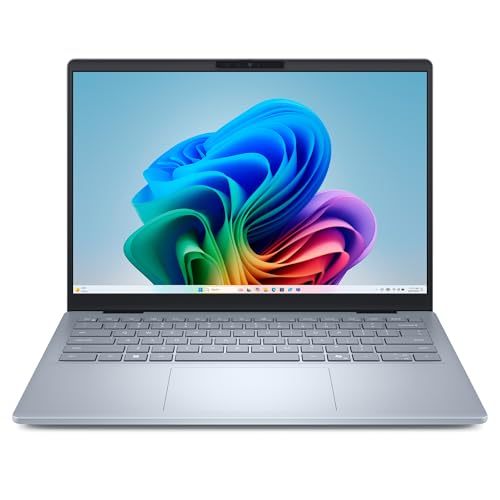
Plenty of shoppers want one simple thing: a Windows laptop that feels modern, handles a full workday and does not cost as much as a flagship. The Dell 14 Plus with the Intel Core Ultra 7 256V is the model we picked for that role. This profile covers the exact configuration on the Amazon listing: Core Ultra 7 256V, 16GB of LPDDR5X memory, a 1TB SSD, Intel Arc graphics and a 14-inch 2560x1600 screen. We do not test products or take our own measurements, so every figure here comes from Dell’s published page, and we say so when something is not stated.
Which Dell 14 Plus Is This?
Dell’s US page lists three configurations of the Dell 14 Plus (model DB14250): one with a Core Ultra 5 226V and 512GB of storage, one with the Core Ultra 7 256V and 1TB, and one with a Core Ultra 7 258V and 32GB of memory. The spec table on Dell’s page matches the middle one, and that is the one the Amazon listing describes. If you see a Core Ultra 5 or a 32GB version on a different listing, it is a different product and the numbers here will not apply exactly.
Processor and Memory
Dell lists the Intel Core Ultra 7 256V as an 8-core chip running up to 4.8 GHz with a 47 TOPS NPU, the neural processing unit used for on-device AI features. Graphics are Intel Arc. Dell lists 16GB of LPDDR5X memory at up to 8533 MT/s, and the word onboard matters: the memory is soldered and cannot be upgraded. For web browsing, Office, video calls and light photo editing, 16GB is comfortable. If you keep dozens of browser tabs open next to large spreadsheets, think about whether you would want more at purchase time, since you cannot add it later.
Storage is a 1TB Gen4 SSD (listed as QLC). One terabyte is generous for a laptop in this class and means you can keep school or work files, photos and a few large programs without constant cleanup.
Display and Keyboard
Dell lists a 14-inch QHD+ display at 2560x1600, antiglare, non-touch, 300 nits, 120 Hz. The listing title calls it 2.5K, which is a common shorthand for that resolution. The 16:10 shape gives you a little more vertical room for documents and web pages than a 16:9 screen, and the 120 Hz refresh rate makes scrolling and cursor movement feel smoother. At 300 nits, the screen is fine indoors but is not the brightest choice if you often work near a sunny window. The antiglare finish helps with reflections.
The keyboard is backlit and includes a Copilot key. Dell lists the touchpad surface as Mylar and the LCD cover and base as aluminum, with a plastic bezel and palmrest.
Ports and Connectivity
The port selection is a real strength for a thin laptop: one Thunderbolt 4 port with DisplayPort 2.1 and Power Delivery, one USB 3.2 Gen 2 Type-C port with DisplayPort 1.4 and Power Delivery, one USB 3.2 Gen 1 port (the classic rectangular USB-A), a full-size HDMI 2.1 port and a universal audio jack. You can connect a monitor over HDMI, a flash drive over USB-A and charge over either USB-C port, all without a hub. Missing from Dell’s list is a memory card reader, so photographers will need a small adapter.
Wireless is Intel Wi-Fi 7 (BE201) with Bluetooth 5.4. As with any Wi-Fi 7 laptop, you need a Wi-Fi 7 router to get the full benefit; it still works normally on older networks.
Weight, Size and Battery
Dell lists a starting weight of 3.42 lb (1.55 kg) and dimensions of 0.67 inch at the back, 0.55 inch at the front, 12.36 inches wide and 8.90 inches deep. The battery is a 4-cell, 64 Wh integrated pack. Dell’s page, as we read it, gives no battery-life hours for this configuration, so we are not going to quote a number. The Lunar Lake generation of Intel chips was designed with efficiency in mind, but your own use matters: screen brightness, refresh rate and apps change battery life more than the spec sheet does.
Who Should Buy the Dell 14 Plus
- Students and professionals who want Windows with a modern chip, a sharp display and a 1TB drive.
- People who connect a lot of things. HDMI, USB-A and two USB-C ports save you from a dongle.
- Home-office workers who dock to an external monitor and like an aluminum lid.
- Anyone curious about AI features in Windows. The 47 TOPS NPU and Copilot+ PC branding are listed by Dell.
Who Should Look Elsewhere
- If you want the lightest laptop. At 3.42 lb it is heavier than the 2.7 lb MacBook Air 13 (M5) in our lineup, and the Surface Laptop is lighter by Microsoft’s published figure.
- If you want a touchscreen. This display is non-touch.
- If you need upgradeable memory. It is soldered.
- If you need the brightest screen outdoors. 300 nits is modest.
- If you want a card reader built in. There is none on Dell’s list.
For readers who want a longer battery and an OLED panel, our HP OmniBook 5 14 profile covers a different approach, with a Snapdragon chip and the app-compatibility trade-offs that come with it. The Dell uses a standard x86 Intel chip, so ordinary Windows software, including older programs and common work tools, runs without emulation.
What to Check on the Amazon Listing
- Configuration. The title should say Core Ultra 7 256V, 16GB and 1TB. A Core Ultra 5 or a different storage size means a different laptop.
- Seller and warranty. Check who sells and ships the laptop and whether Dell’s warranty applies to that unit. Laptops are sometimes listed by third-party sellers.
- Operating system. The listing says Windows 11 Home. If your workplace requires Pro, ask IT about an upgrade path before buying.
- Return policy. Confirm the return window and keep the box for the first few weeks.
Because we do not list prices on this site, use the button below to see the current price on Amazon.
Bottom Line
The Dell 14 Plus with Core Ultra 7 256V is a practical Windows laptop with a sharp 16:10 screen, a generous 1TB drive, a real port selection and Copilot+ PC branding. Its trade-offs are the soldered memory, the non-touch 300-nit screen and a weight that is average rather than featherweight. If you want Windows without surprises, it is the all-round pick on our list.
See price on Amazon
See how it stacks up against eight other laptops in our 2026 laptop rankings.
Sources