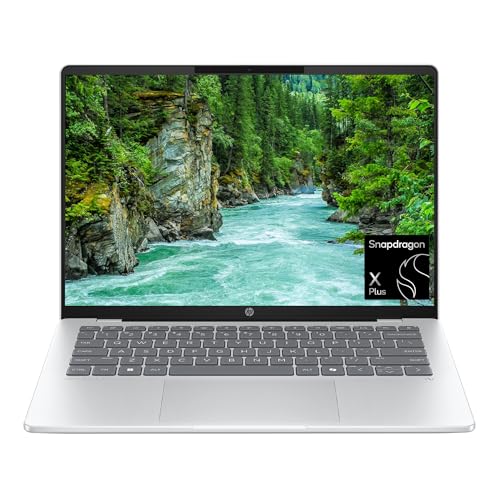
The HP OmniBook 5 14 is for people who care more about the screen and the battery than about raw speed. The configuration on the Amazon listing pairs a Qualcomm Snapdragon X Plus X1P-42-100 with 16GB of memory, a 1TB SSD and an OLED display in a 14-inch body. The catch is that Snapdragon chips use Arm technology, not the Intel or AMD x86 chips found in most Windows laptops, and that changes what software you can run. This profile explains the trade-offs. We do not test products or run our own measurements, so everything here is attributed to HP, Microsoft or a named publication, and we leave out figures we could not confirm for this exact configuration.
Which OmniBook 5 14 Is This?
HP sells the OmniBook 5 14 with several processors: its family page lists options up to AMD Ryzen AI 9, Intel Core Ultra 9 and Qualcomm Snapdragon X Plus. The listing we picked is the Snapdragon version, model 14-he0099nr, in Glacier Silver, with 16GB of RAM and a 1TB SSD. Details such as battery claims and display brightness differ between processor versions, so we avoid copying figures that HP attaches to another configuration.
The Snapdragon X Plus Chip
Notebookcheck’s database entry for the OmniBook 5 14 lists the Snapdragon X Plus X1P-42-100 as eight cores running at 3.4 GHz, based on Qualcomm’s Oryon design. In everyday terms, it is a chip made for responsiveness in web browsing, document work, video streaming and video calls, with efficiency as its main selling point. It is not meant for heavy video editing, 3D work or serious gaming. Notebookcheck describes the Adreno X1-45 graphics as only just sufficient for pre-2020 games at 720p and low settings, so do not expect much from this laptop as a gaming machine.
Windows on Arm: What Works and What Does Not
This is the section to read twice. Microsoft’s Windows Arm-based PCs FAQ says:
- Drivers for hardware, games and apps only work if they are designed for a Windows 11 Arm-based PC.
- Games can fail if they rely on anti-cheat drivers that are not made for Arm.
- Some third-party antivirus software cannot be installed unless it is made or updated for Arm. Windows Security remains available.
- Apps that customize Windows, including some input method editors, assistive technologies and cloud storage apps, might have problems.
On the positive side, Microsoft says apps not built for Arm can run through emulation, and that Windows 11 version 24H2 includes the Prism emulator for improved performance of emulated apps. Apps built natively for Arm run best. In practice, that means the popular programs, such as browsers, Microsoft 365, video-call apps and streaming, are well supported, while niche programs, older utilities, certain VPN or security tools, and some printers or accessories with their own drivers are the risk. Before you buy, list every program you need for work or school and check each with its developer, or use the crowdsourced compatibility site that Microsoft points people to, worksonwoa.com.
If you rely on a program your employer provides, ask IT whether it runs on Windows on Arm.
Display
The listing calls out an OLED display. Notebookcheck lists the 14-inch 16:10 panel at 1920x1200 pixels, which is a sharp image at this size. HP’s family page describes a 14-inch 2K OLED touch display in one section and offers up to a 3K OLED on the Snapdragon laptop line, without tying either to a specific model number, so check the listing for the resolution and whether it is touch before you rely on either. OLED panels produce deep blacks and strong contrast, which makes movies and photos look striking. They also tend to be glossier than matte screens, so consider reflections if you work near windows.
Weight, Ports and Battery
Notebookcheck’s database lists the OmniBook 5 14 at 2.84 lb (1.29 kg) and a 59 Wh battery. The ports include USB-C and HDMI on the sides according to HP’s family page, which mentions a headphone jack on one side and HDMI and two USB-C ports on the other. Notebookcheck’s entry lists USB ports in a slightly different way, and one publication in its roundup notes that you give up some ports compared with rivals. Because the sources do not fully agree, count the ports on the listing’s photos and spec bullets if a specific port, such as USB-A, matters to you.
On battery life, HP’s family page uses a local video playback figure of up to 42 hours with a footnote, but the page does not name the processor, and HP’s longest claims usually apply to other versions. We therefore do not attach any hours to the X1P-42-100 model. Notebookcheck’s page notes that trade publications called the battery life fantastic and that a WLAN result of over 16 hours was reported in a news headline, without test details on that page. Treat those as indications, not guarantees.
Who Should Buy the OmniBook 5 14
- Students and office workers who live in a browser, Microsoft 365 and video calls, and want a laptop that does not need frequent charging.
- Movie watchers and travelers who enjoy an OLED panel.
- Anyone who can verify their apps on Windows on Arm before ordering.
- Shoppers who want a lot of storage (1TB) in this class of laptop.
Who Should Look Elsewhere
- Gamers. Choose a laptop with a dedicated graphics chip. Anti-cheat issues on Arm make multiplayer games especially unreliable.
- People who need niche Windows software, hardware drivers or older accessories that may not have Arm versions.
- Anyone who wants the most compatible Windows laptop. The Dell 14 Plus uses a standard Intel chip and avoids Arm compatibility questions.
- Buyers who want a premium touchscreen Windows machine. See the Surface Laptop 13.8-inch profile, which also runs on Arm but is positioned higher.
What to Check on the Amazon Listing
- Model number. Look for 14-he0099nr and the Snapdragon X Plus X1P-42-100, 16GB and 1TB.
- Seller and warranty. Make sure HP’s warranty covers the unit and that the seller is clearly identified.
- Operating system. Windows 11 Home on Arm. Programs that need x86-only drivers will not work.
- Screen details. The listing says OLED. Confirm resolution and touch support in the description.
- Return window. Try your must-have apps right away and return the laptop if one fails.
Because we do not list prices on this site, use the button below to see the current price on Amazon.
Bottom Line
The HP OmniBook 5 14 with Snapdragon X Plus is a smart pick for readers whose daily work is the web, Office, streaming and calls, who value an OLED display and an efficient chip, and who have confirmed that their software runs on Windows on Arm. If one key program or accessory fails that check, choose an Intel laptop instead.
See price on Amazon
See how it stacks up against eight other laptops in our 2026 laptop rankings.
Sources