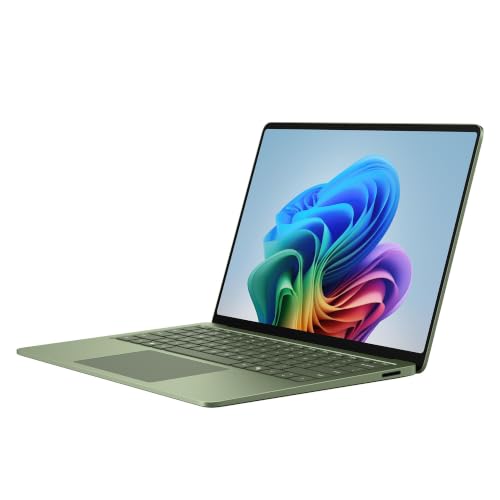
Microsoft’s 2026 Surface Laptop 13.8-inch is a premium Windows laptop aimed at people who spend long days in documents, email, meetings and the browser and want a screen they can touch. The listing we picked is the Snapdragon X2 Elite version in Jade with 16GB of RAM and 512GB of storage. Because it runs on an Arm processor and not an Intel or AMD one, the main question is software compatibility, which we cover in detail below. We do not test products or take our own measurements, so every number comes from Microsoft’s Surface pages and is attributed.
Which Surface Laptop Is This?
Microsoft’s page for the 13.8-inch Surface Laptop (8th Edition) lists two chips, the Snapdragon X2 Plus with 10 cores and the Snapdragon X2 Elite with 12 cores. The Amazon listing names the X2 Elite. Microsoft’s page does not list storage options or colors for this model in the parts we read, so the 512GB and Jade details come from the Amazon listing title. This is not the 2024 7th Edition, and it is not the 15-inch 2026 model. Microsoft’s FAQ says the 13.8-inch model offers up to 64GB of RAM and notes that Copilot+ PC features are available only on select configurations with 16GB or more of RAM, which this configuration has.
Display and Touch
Microsoft lists a 13.8-inch HDR PixelSense touchscreen LCD at 2304 x 1536 with a 120 Hz refresh rate, and 10-point multi-touch for tapping, swiping, scrolling and pinching. The 3:2 shape of the panel, close to a sheet of paper, gives more vertical room for documents and web pages than a widescreen laptop. The 120 Hz refresh rate makes scrolling and touch interactions feel smoother. Some retailer pages describe a different resolution, so rely on Microsoft’s figures and check the listing text.
A touchscreen is useful for markup, for tablet-style reading in tight spaces such as airplane seats and for quickly tapping through apps. If you never touch the screen, you are paying for something you will not use, and a non-touch Windows laptop such as the Dell 14 Plus may be the better fit.
Weight, Size and Battery
Microsoft lists the 13.8-inch Surface Laptop at 2.96 lb (1,342 g). That is light enough for daily travel and lighter than many 14-inch Windows laptops, though a bit heavier than the 2.7 lb MacBook Air 13.
For battery life, Microsoft’s page lists up to 20 hours of local video playback and up to 16 hours of active web browsing for the 13.8-inch model. The footnote on the page mentions a 512GB test unit, which matches the storage on this listing. As with every manufacturer rating, your result will depend on screen brightness, apps and wireless use.
Ports
Microsoft lists two USB-C/USB4 ports, one USB-A 3.2 port, a 3.5mm audio jack and a Surface Connect port. That is a handy mix for a thin laptop: you can plug in an older flash drive or mouse with the USB-A port and keep both USB-C ports for a monitor and charging. There is no HDMI port or card reader on Microsoft’s list, so presenters and photographers should plan for an adapter.
Windows on Arm: The Part to Read Carefully
The Snapdragon X2 Elite is an Arm chip. Microsoft’s Windows Arm-based PCs FAQ says:
- Drivers for hardware, games and apps only work if they are designed for a Windows 11 Arm-based PC.
- Games may not work if they rely on anti-cheat drivers that are not made for Arm.
- Some third-party antivirus software cannot be installed unless it is made or updated for Arm, although Windows Security remains available.
- Apps that customize Windows, such as some input method editors, assistive technologies and cloud storage apps, might have problems.
Microsoft also says that apps not built for Arm can run using emulation, with the Prism emulator in Windows 11 version 24H2 improving performance for emulated applications, and that apps rebuilt natively for Arm perform best. What this means for you: popular software like browsers, Microsoft 365 and video-call apps is usually fine, but specialized business tools, VPN clients, security software, printer drivers and engineering programs deserve a check. If your employer or school requires a particular app, ask IT whether it supports Windows on Arm before buying. A crowdsourced compatibility list that Microsoft points to is worksonwoa.com.
Chip, Memory and Everyday Speed
Microsoft’s table lists the 12-core Snapdragon X2 Elite as the top option for this size, with the 10-core X2 Plus below it. Microsoft’s page does not give clock speeds or benchmark scores for the configuration we picked, and retailer pages disagree with each other on clock speed, so we will not quote one. What matters for most buyers is the class of work: documents, spreadsheets, many browser tabs, video meetings and streaming are the everyday tasks this kind of chip is built for. The 16GB of RAM on this listing is enough for that kind of multitasking, and it also meets the 16GB minimum that Microsoft states for Copilot+ PC features.
Storage is 512GB according to the listing title. That is comfortable for documents and a modest photo library, but if you keep large video files or many local projects, plan on cloud storage or an external drive.
Who Should Buy the Surface Laptop 13.8
- Office workers and consultants who want a light, polished Windows laptop with a touchscreen for meetings and travel.
- Students whose software is browser-based or Microsoft 365-based.
- Frequent flyers who benefit from the 2.96 lb weight and long battery rating.
- Readers who want a premium Windows experience with Microsoft’s own hardware.
Who Should Look Elsewhere
- Anyone who needs Windows software with specialized drivers or engineering tools. Consider an Intel laptop such as the Dell 14 Plus.
- Gamers and heavy creative users.
- Buyers who need HDMI or a card reader without an adapter.
- People who prefer a battery-first mid-range Arm laptop with OLED. The HP OmniBook 5 14 profile covers an alternative that also uses Windows on Arm.
What to Check on the Amazon Listing
- Edition and size. The title should say 2026, 13.8-inch and Snapdragon X2 Elite. Do not mix it with the 2024 7th Edition or the 15-inch model.
- Configuration. 16GB of RAM and 512GB of storage. Copilot+ PC features require 16GB or more according to Microsoft.
- Seller and warranty. Check who sells and ships the laptop and whether Microsoft’s warranty applies. Premium laptops are sometimes listed by third-party sellers.
- Return window. Try your key apps right away and return the laptop if one does not run.
Because we do not list prices on this site, use the button below to see the current price on Amazon.
Bottom Line
The Surface Laptop 13.8-inch with Snapdragon X2 Elite is a good fit for people who want a light, touch-enabled Windows laptop for work and travel and whose software lives in the browser or in apps that support Arm. If you rely on a niche tool, confirm compatibility first, or choose an Intel laptop instead.
See price on Amazon
See how it stacks up against eight other laptops in our 2026 laptop rankings.
Sources