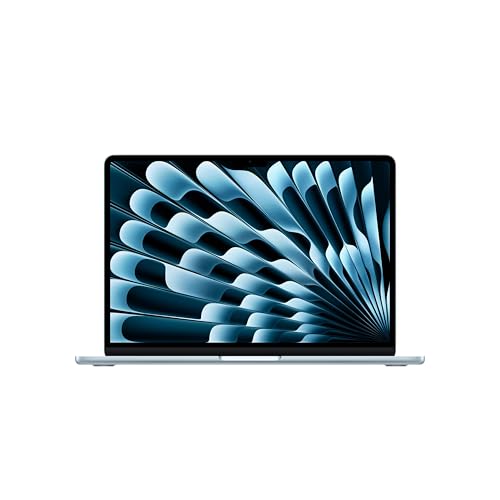
If you want a laptop that does the ordinary things very well, fits in a backpack without being noticed and lasts through a long day, the 13-inch MacBook Air with the M5 chip is the one most people should look at first. This page sticks to what Apple publishes about this exact model: the 13.6-inch Air with the M5 chip, 16GB of memory and a 512GB SSD, the version we picked from the Amazon listing. We do not test products or run our own measurements, so every number below is attributed to its source, and anything Apple does not state is left out.
What You Are Buying
According to Apple, the MacBook Air with M5 was announced on March 3, 2026, with orders opening March 4 and availability beginning March 11. The chip has a 10-core CPU made of 4 super cores and 6 efficiency cores, a GPU with 8 or 10 cores depending on the configuration, and a 16-core Neural Engine. Apple’s tech specs list 16GB of unified memory and a 512GB SSD as the standard configuration, with options up to 32GB of memory and 4TB of storage on Apple’s own store. Amazon listings usually carry fixed configurations, so the version on the page you are looking at is the one you get.
This is not the 15-inch Air and it is not an M4 model. If you are comparing prices across older and newer Airs, make sure the product title says “13-inch” and “M5” before you click anything.
Display, Keyboard and Camera
Apple lists a 13.6-inch Liquid Retina display with a native resolution of 2560 by 1664, 224 pixels per inch, and a rating of 500 nits of brightness. It supports one billion colors and the P3 wide color gamut. In plain terms, text is sharp at normal desk distance, colors are accurate enough for casual photo editing, and brightness is fine for a classroom or a coffee shop. Apple does not list an OLED panel or a 120Hz refresh rate for this model, so do not expect either.
The backlit Magic Keyboard includes Touch ID, which means you can unlock the laptop, approve purchases and fill passwords with a fingertip. The camera is a 12MP Center Stage camera with Desk View support, recording at 1080p HD. For video calls, Center Stage keeps you framed if you shift in your seat. Apple also lists a four-speaker sound system and a three-microphone array.
Size, Weight and Battery
Apple gives the weight as 2.7 pounds, noting that it varies by configuration. The body is 0.44 inch thick, 11.97 inches wide and 8.46 inches deep. That is easy to carry for a student with a full bag or a commuter who walks between meetings.
Apple rates the battery for up to 18 hours of video streaming and up to 15 hours of wireless web use. The built-in battery is 53.8 watt-hours. Treat those hours as ceilings measured under Apple’s conditions: brightness, apps and wireless use will change the real number. The included charger is a 40W Dynamic Power Adapter, listed with a 60W maximum. Because the MagSafe 3 port charges the laptop, you keep both Thunderbolt ports free while the laptop is plugged in.
Ports and Wireless
The port list is short: two Thunderbolt 4 (USB-C) ports, one MagSafe 3 port and a 3.5 mm headphone jack. There is no HDMI port, no SD card slot and no USB-A port. If you copy photos from a camera card, connect to a projector at school or use older USB-A accessories, budget for a compact hub or an adapter. For wireless, Apple lists Wi-Fi 7 (802.11be) and Bluetooth 6 through its N1 chip. Wi-Fi 7 only helps if your router supports it too, but the laptop will work fine on Wi-Fi 6 and older networks.
Who Should Buy It
The Air fits you if you:
- Are a student or a parent buying for one, and want a laptop that carries easily and runs a full day of classes.
- Write, research, manage email and live in a browser, Microsoft 365 or Google Workspace.
- Already use an iPhone and want AirDrop, iMessage, iCloud and easy photo transfer.
- Want a simple setup with fewer pop-ups and a long period of software updates from one company.
- Do light creative work such as photo editing, podcast editing or 1080p video, where a premium chip gives you headroom.
Apple’s newsroom post also describes the chip as up to four times faster for AI tasks than the M4 model, based on Apple’s own testing in February 2026. That is a vendor comparison against the previous model, so read it as a sign of direction rather than a promise for your daily work.
Who Should Skip It
Pass on this model if any of these apply:
- You need Windows-only software. Some engineering, CAD, accounting and industry programs have no Mac version. Ask your school or employer for the exact software list before you buy a Mac.
- You need many ports. With two USB-C ports and no card reader, heavy peripheral users will need a hub.
- You edit long 4K video or run heavy 3D work. The Air will do it, but the MacBook Pro 14 is the machine built for sustained loads. Read our MacBook Pro 14 (M5) profile to see what changes.
- You want a touchscreen. Apple’s spec page does not list one for this model.
- You prefer a Windows laptop with a mid-range chip. Our Dell 14 Plus profile covers a Windows alternative with more ports.
macOS Considerations
The Air ships with macOS, and Apple’s newsroom post names macOS Tahoe on this model. Microsoft 365, Google Chrome, Zoom, Slack, Adobe Creative Cloud and most mainstream software have Mac versions. Games are the weak spot: the library of Mac versions is far smaller than on Windows. If you must run a Windows app, check whether the developer offers a web or Mac version first, since virtualization has its own limits and costs.
What to Check on the Amazon Listing
Before ordering, scroll through these points on the listing:
- The title says 13-inch, M5, 16GB and 512GB. That is the configuration this profile describes.
- Seller and fulfillment. See who sells and ships it. Amazon listings for laptops sometimes include third-party sellers, and you want a unit with a full manufacturer warranty.
- Color. Apple lists Sky Blue, Silver, Starlight and Midnight. Photos on the listing show the color for the option you select.
- Return window. Know the return policy before you open the box and set up the device.
- Protection. Ask yourself whether AppleCare or a third-party plan makes sense for a laptop that will be carried daily.
Because we do not list prices on this site, use the button at the bottom to see the current price and the exact configuration on Amazon.
Bottom Line
The 13-inch MacBook Air with M5 is a calm, portable and capable laptop that suits students, writers, remote workers and anyone who wants a computer that gets out of the way. Its limits are clear: two USB-C ports, macOS only, and a body that is not built for hours of sustained heavy workloads. If those limits do not bother you, it is the safest first stop in this category.
See price on Amazon
See how it stacks up against eight other laptops in our 2026 laptop rankings.
Sources